Wednesday, May 27, 2009

Is this what we're all waiting for?

The newest whispers are that Wintek has been independently confirmed as the supplier for an Apple "e-book form factor netbook product," which reads as a tablet-PC with a display somewhere in the 9-10 inches range. Meanwhile Piper Jaffray analyst Gene Munster has been at it again, offering a fairly detailed prediction about the device. According to Munster, the project's been delayed until early 2010, and it'll run a third version of OS X that's halfway between the iPhone and Apple's full operating system. He expects it to be in the $500 to $700 price range.

Meanwhile, Micheal Arrington over at TechCrunch is taking time off from promoting his own pseudo-netbook to say that there's evidence Apple's diverted "significant" personnel from the iPhone and MacBook teams to work on the project, that the device is "very real" and will be "particularly useful for gaming." Would anyone out there buy one?


Tuesday, May 26, 2009

Facebook Tips/Tricks You Might Not Know

How To Place Facebook Chat On Firefox Sidebar

If you are using Firefox, you can place the Facebook Chat at the sidebar.

Facebook Chat is cool, at least it allows you to send instant messages to online Facebook contacts. However I’m not really a fan of the chat bar being at the bottom of the page, what if I’ve left Facebookbut still wants to remain chatting with my Facebook contacts? If you are using Firefox, you can place the Facebook Chat at the sidebar.

Step 1

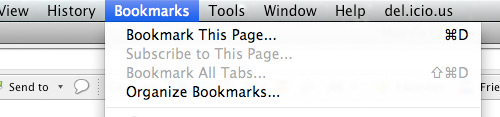
Look for Bookmarks on the top navigation. Select Organize Bookmarks…
facebook chat

Step 2

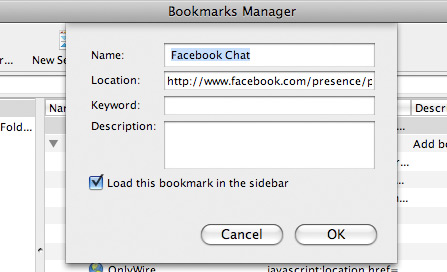
Click New Bookmark... tab and enter the following:

  • Name: Facebook Chat
  • Location: http://www.facebook.com/presence/popout.php
  • Check Load this bookmark in sidebar.

fchat02.jpg

Step 3

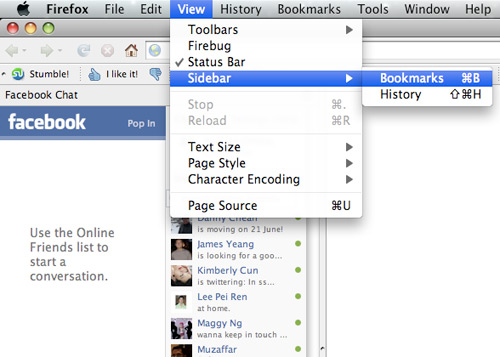
Launch the Firefox sidebar, click Facebook Chat and start chatting with your Facebook contacts within Firefox.

fchat03.jpg

Tuesday, May 19, 2009

iPhone "Field Test" mode

The iPhone's Field Test mode gives technical information on how well the iPhone is connecting to the cell towers.

To activate Field Test Mode: bring up the keypad, type in *3001#12345#* and press the Call button.

This brings up the Field Test main menu. (Note that you should see the signal strenth bars in the upper left corner of the screen replaced with a number indicating the strength of the signal in decibels.)

The signal strength is indicated as a negative number, and the lower the number the better. You can use this feature to determine where the best reception is at work and at home.

Turn off 3G to improve phone performance and conserve battery power

Unless you are in an area with good reception, you'll probably get better cell performance and longer battery life with 3G turned off. To turn off 3G, tap on the Settings icon in the home screen, select General and the Network.

iPhone tip: Save Web Pictures

If you're browsing the Web with Safari on your iPhone and see an image you want to save, touch and hold down on the image with your finger. A menu will pop up allowing you to save the image to your photos folder.